





The Ideal
Phone System for
Remote Workers
See how UCOM GO Softphone PBX can support your remote workers.
See how UCOM GO Softphone PBX can support your remote workers.
The Ideal
Phone System for
Remote Workers
PBX Phone Solutions Built for Remote Workers
Remote work has become a defining feature of the modern business landscape, reshaping how businesses operate, compete, and grow. Being remote capable means that a business positions itself to be more agile, more competitive and with access to a wider pool of talent.
PBX Phone Solutions Built for Remote Workers
Remote work has become a defining feature of the modern business landscape, reshaping how businesses operate, compete, and grow. Being remote capable means that a business positions itself to be more agile, more competitive and with access to a wider pool of talent.
UCOM GO Solutions
By no longer being limited to hiring candidates within commuting distance of the office, businesses can access specialists and high performers worldwide without expanding their physical office footprint. CLICK on the Key Requirement icon to reveal our solution.
Remote Functionality
The PBX system must function just as effectively outside a physical office as within. This ensures that every team member, whether on site or remote, can communicate and collaborate seamlessly.
Our Solution

UCOM PBX Features
Every call is an opportunity, and a fully featured cloud PBX makes sure you never waste one. With a complete set of enterprise grade features and functions, you get the tools to route calls smarter, respond faster, and never leave a customer waiting, all without the cost or complexity of an on-premise phone system. Take control of every call with a UCOM PBX, built to improve efficiency and productivity. One PBX system, ready for wherever your business goes next. Communication made simple, in one place.

 IVR Menu Prompts
 Time of Day Routing
 Voice2Email
 Hunt Groups
 Call Queuing
 Inter-Account Calling
 Input Code Prompting
 Call Recording
 Call Park
 Busy Lamp Fields
 Call Transfer
 Missed Call Notifications
 Call Forwarding
 Call Waiting
 Listen In
 Barge InIVR Menu PromptsTime of Day RoutingVoice2EmailHunt GroupsCall QueuingInter-Account CallingInput Code PromptingCall RecordingCall ParkBusy Lamp FieldsCall TransferMissed Call NotificationsCall ForwardingCall WaitingListen InBarge InIVR Menu PromptsVoice2EmailCall QueuingInput Code PromptingCall ParkCall TransferCall ForwardingListen InIVR Menu PromptsVoice2EmailCall QueuingInput Code PromptingCall ParkCall TransferCall ForwardingListen InTime of Day RoutingHunt GroupsInter-Account CallingCall RecordingBusy Lamp FieldsMissed Call NotificationsCall WaitingBarge InTime of Day RoutingHunt GroupsInter-Account CallingCall RecordingBusy Lamp FieldsMissed Call NotificationsCall WaitingBarge In
Go Anywhere with UCOM GO Softphone PBX
Call, message and SMS using just one unified system. Get all the latest PBX features to create an outstanding caller experience and unite your team with an all-in-one business phone system from $10 per user.

Frequently Asked Questions
Everything you need to know about UCOM Go for Remote Workers
UCOM GO is a cloud-based business phone system built around a softphone app. It gives each employee a dedicated business number that works on any smartphone or laptop, so your team can make and take business calls from anywhere without using their personal number.
Yes. It's designed specifically for remote and hybrid working. The PBX operates just as effectively outside the office as within it, so on-site and remote staff can communicate and collaborate seamlessly using the same system.
Yes. UCOM PBX is built to function just as effectively outside a physical office as within it, making it perfectly suited to remote and hybrid teams. Every team member, on-site or remote, can communicate and collaborate seamlessly through the same system. There are a couple of ways to set up a remote team member:
- IP Desk Phone: configured with the remote worker's credentials and connected to the main PBX, the IP phone can be plugged into an internet connection anywhere in the world and will operate exactly as it would at head office.
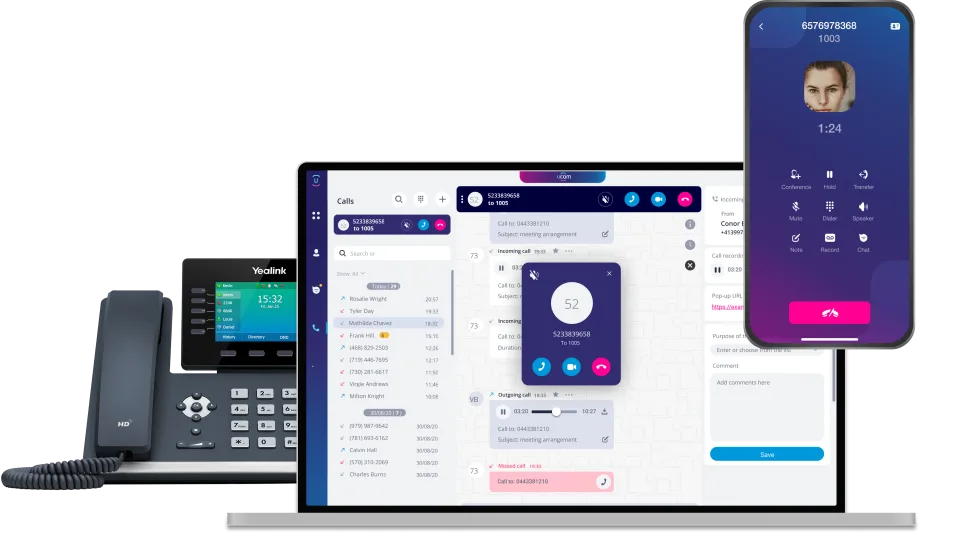
- UCOM Softphone App: works on any smartphone or laptop, turning that device into a fully functional business phone connected to the main PBX.
UCOM PBX gives remote and hybrid workers plenty of flexibility in how they connect:
- IP Desk Phone: a physical desk phone configured with the worker's credentials and connected to the main PBX. Plug it into an internet connection anywhere in the world and it operates exactly as it would at head office.
- Smartphone: using the UCOM Softphone App, any iOS or Android smartphone becomes a fully functional business phone, complete with a dedicated business number, so staff never need to use their personal number.
- Laptop or desktop computer: the UCOM Softphone App (available as a desktop app) turns any computer into a business phone for making and taking calls directly from a Mac or PC.
Because the UCOM Softphone App works across devices, team members can stay connected on whichever device suits them best, whether they're at home, in the office or on the move.
Remote work has become a defining feature of the modern business landscape, reshaping how businesses operate, compete and grow. Adopting a remote-capable phone system positions your business to take full advantage of that shift, rather than being held back by a setup tied to a single physical location. Following are 6 main reasons why:
- Access a wider talent pool: you're no longer limited to candidates within commuting distance of an office. A remote-capable system opens the door to specialists, niche experts and high performers wherever they're based, giving you a real advantage when hiring for hard-to-fill or highly skilled roles.
- Stay agile and competitive: your team can work from anywhere without any drop in communication quality or professionalism, so you can respond quickly to customers and adapt to changing circumstances as they arise.
- Grow without expanding your physical footprint: businesses with limited or no office space can add team members through per-user pricing and the softphone app, without investing in more desks, hardware or premises. Growth stays cost-effective and scalable.
- Maintain business continuity: because the system isn't tied to a single location, your team can keep making and taking calls during disruptions, office closures or relocations, keeping you connected to customers when it matters most.
- Project a consistent, professional image: features like Auto-Attendant, Business Intro, on-hold music and messages, and automatic failover to Voice2Email ensure every caller has the same polished experience, no matter where your staff are working from.
- Scale up or down with ease: per-user pricing and no hardware requirement mean you can add or remove users as your needs change, so your phone system always matches the size and shape of your business.
Security is built into the UCOM PBX system whether your team works in the office or remotely. Remote devices such as IP desk phones and the UCOM Softphone App connect to the main PBX using encrypted connections, so calls and data are protected in transit. Each user authenticates with their own unique credentials, ensuring only authorised staff can access the system. Because remote workers connect through the same secured PBX as your in-office team, you maintain consistent control and protection across your entire workforce, no matter where they're based.
Getting started with UCOM is simple, and the team will guide you through every step. The best place to begin is by booking a demo, where you'll get a complete walkthrough of the phone system and can see firsthand how its features work for remote and hybrid teams.
There are a few easy ways to get in touch:
- Book a demo or enquire online through UCOM's enquiry form, providing a few details about your business and what you're looking for.
- Call the team on 1800 008 266.
Whether you're setting up remote workers for the first time, scaling an existing team, or moving away from an older phone system, the UCOM team will help you find the right solution to your needs.